Blog Post 4: Redefinition

Like Modification before it, Redefinition calls for the teacher to think in new ways to design truly transformative learning experiences, drastically different from those previously possible without the use of technology. There is also a specific focus on students taking charge of their own education at this level (Common Sense Education 2016, July 12). This may include the class collaborating on a large-scale film project as an activity extending over a unit in an English class. Students would form groups to take on different portions of the task by using software: collaborating to produce a script using Google Docs, using Google Hangouts and OneNote to create a storyboard laying out how the film will be shot, scheduling a shooting timeline on Google Calendar, etc. These would allow students to collaboratively create something for which they can have a genuine sense of pride and ownership, needing only subtle direction from the teacher.
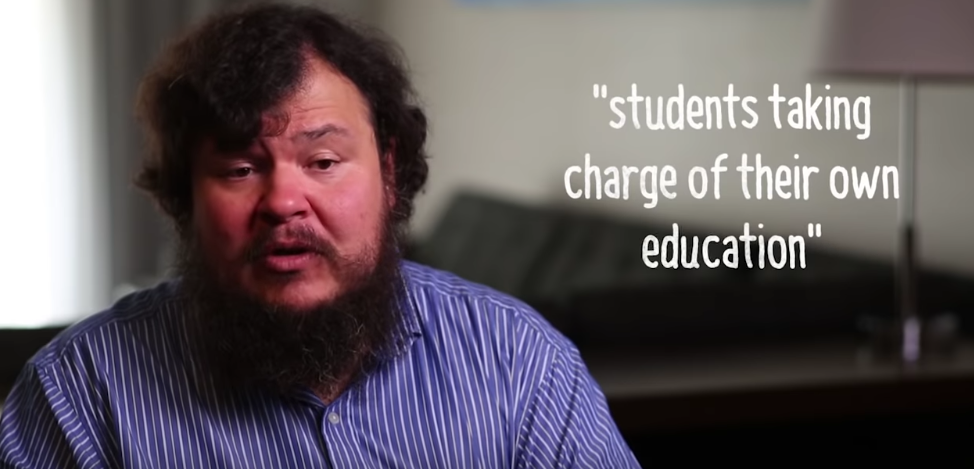
Ruben Puentedura affirming the importance of student ownership in Redefinition – Taken from video by Common Sense Education (2016, July 12)

Assuming proper access to equipment, an IT class may be able to use 3D modelling tools to create a model of their own design, regardless of specific form, and produce it using technologies such as a 3D printer or laser cutter. The teacher would give students guidelines but provide the freedom to decide what they create. Students would receive resources to learn the skills they needed, such as recordings of practical demonstrations either from the teacher or other creators, applying the demonstrated skills to their own projects. While the teacher must be mindful of online safety in student’s search for resources, providing the opportunity for independent research would also give students the chance to learn how to develop without support, which is incredibly important in a rapidly developing world.

Below is a lesson plan that includes a video call with an expert in the topic being discussed in class.

References:

Common Sense Education. (2016, July 12). How to Apply the SAMR Model with Ruben Puentedura [Video file]. Retrieved from https://www.youtube.com/watch?v=ZQTx2UQQvbU

Blog Post 3: Modification

In contrast to the directness of Substitution and Augmentation, two forms of incorporating technology into pedagogy that are considered ‘enhancement’, Modification involves going beyond what is generally considered traditional teaching practices and thinking of ways to significantly alter the task in ways not possible before. For example, a teacher may redesign an assignment normally given in the form of an essay to instead have students create a video exploring the same ideas. This opens up a great number of options for the teacher or students to style their response as they please, allowing straight-forward presentations akin to a speech or documentary formats for a more advanced task. Moreover, this task gives a more genuine sense of real-world applicability, as students will be able to see how the skills developed may be reflective of professional work.

Modification can also be used in more routine education processes as well. Software such as OneNote and similar programs contain functionality to embed photos, videos and audio recordings into notes. This gives students the potential to record experiences in more useful forms, opening the possibility of including activities such as explorative investigation, online videos, or interviews with experts as part of standard learning. A specific example for English classes may include students interviewing a stage actor involved in a production of the Shakespearean play studied in class in order to learn how the actor approaches and understands the role. This activity moves learning beyond retention of information given by the teacher and into the realm of exploration.

Below is a lesson plan in which students create a podcast, as well as a podcast discussing the flipped classroom.

Blog Post 2: Augmentation

Augmentation, much like substitution, involves leading students through very much familiar and traditional learning experiences, albeit with the use of technology to provide some advantages. For example, a language accuracy tool such as Grammarly, when used well, gives students the opportunity to reflect on and refine their grammar, spelling, and syntax. Actively involving the tool in a lesson alongside a word processing application, students will be shown any errors they may make in their written tasks, which would otherwise be left for the teacher to indicate in marking – something that may not be available for a student’s personal notes, nor useful when simply returned to the student on paper. Rather, Grammarly allows students to actively practice language accuracy during the act of writing, where it may be more helpful in the long term.


Image modified from Original by Lingo Media

Another example also involves making specific use of features included in modern word processing programs. Both Microsoft Word and Google Docs feature the ability to attach comments and add suggested edits to a document. On the face of it, this is no different to merely returning a student’s task with written feedback and corrections, however as this feature allows comments and edits to be given during the writing process, it becomes more feasible and convenient for a teacher to give direction to a student during the task, rather than afterwards. This may be used in a lesson, with the students notifying the teacher when they would like assistance, or outside of class with a student emailing the teacher when necessary.

Having students construct websites may also be an interesting and useful means of augmenting a lesson. Below is a lesson plan wherein students create an online portfolio of poetry they create to be shared with the world, along with an example site.

https://sites.google.com/view/cmcclellandsamraugmentpage/home

Blog Post 1: Substitution

Substitution involves using technology in the place of more conventional tools as a direct replacement without altering the details of the activity (Puentedura). For example, in a content heavy lesson that requires students to take lots of notes, a teacher may present information for students to copy down using a computer slideshow instead of writing on the board. This frees the teacher from having to copy the notes onto the board themselves, preventing error and allowing the teacher to provide more explanation if a student has difficulty understanding what is said. The cognitive load requirement for the teacher is reduced, allowing more effective and active teaching. However, as this is an example of substitution, the result for students is largely the same as traditional practice.

Image modified from Original by Lingo Media

Another example may include students viewing information in a digital format rather than physical. For example, a lesson may have students reading from a newspaper article and either discussing the text in class or summarising and responding to it. Conventional teaching practice in this circumstance would involve the teacher having prepared printed copies of the article or procure newspapers for the class to use. A teacher may instead substitute these physical copies by providing the link to a digital newspaper for students to access through computers or their devices. While functionally unchanged in lesson content, this has the benefit of not needing large amounts of printing and allowing more recent articles to be chosen – especially compared to purchased newspapers.

Included below is a sample lesson plan featuring a conventionally pen-and-paper writing exercise substituted with technology.

Puentedura, R. [Ruben Puentedura]. (2013, January 7). Technology In Education: A Brief Introduction [Video File]. Retrieved from https://www.youtube.com/watch?v=rMazGEAiZ9c